
H3 视频 生成水上闯关|先画分镜图,再让图片给 H3“指路”

H3 视频 重新尝试水上闯关视频。
这次做水上闯关视频,我没有直接把一整套关卡塞进 H3。
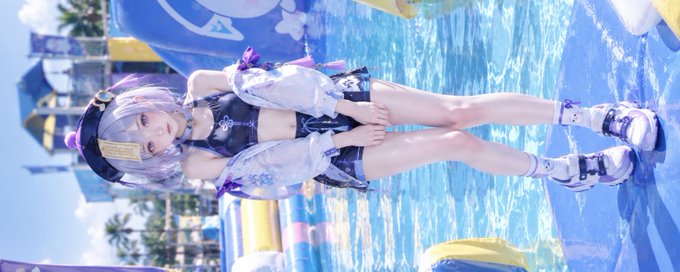
而是先生成一张完整的场景分镜图,再让 H3 根据这张图理解: 图1 人物图 见文章封面。 图2 场景图。
人物是谁、关卡长什么样、障碍物怎么连接、角色应该往哪里走、镜头应该怎么拍。
这个方法最大的好处,是可以明显减少 H3 自己“脑补关卡”的情况。
① 第一张图:只负责“人物”
Picture 1 只放最终真人角色。
它负责:
- 人物身份
- 脸
- 发型
- 身材比例
- 服装
- 鞋子
- 配饰
不要让 Picture 1 同时承担复杂的关卡设计。
核心思想就是:
Picture 1 = Who
② 第二张图:专门生成“场景分镜图”
然后单独制作 Picture 2。
这张图不需要追求真人效果。
甚至可以使用:
白模 / 灰模 / 3D 人体占位模型 / 简单场景预演
因为它的任务根本不是提供人物。
它只负责告诉 H3:
这个世界里的关卡到底长什么样。
例如可以在分镜图里明确画出:
旋转滚筒 吊环 浮动平台 连接桥 水平旋转星形障碍 斜坡 终点
这样 H3 后面生成视频时,不需要自己从文字重新设计整套场景。
③ 最重要的一点:不要只用数字锚定关卡
这是我这次比较推荐的一个方法。
不要只写:
② → ③ → ④ → ⑤
因为数字本身没有视觉意义。
H3 并不知道“②”究竟是什么。
更好的写法是:
large red-and-white horizontal rotating cylinders
overhead rectangular frame with hanging rings
separate blue, white and red floating platforms
large horizontal rotating star with red-and-blue arms
也就是说:
用“关卡本身的视觉特征”作为锚点。
例如不要:
Subject 1 reaches obstacle ⑤.
而是:
Subject 1 accelerates toward the large horizontal rotating star with red-and-blue arms.
这样 H3 可以把:
文字描述 ↔ Picture 2 中的具体视觉对象
建立对应关系。
这比纯数字编号稳定很多。
④ 数字可以辅助,但不要让数字承担空间定位
我现在更倾向于:
④ FLOATING PLATFORMS → BRIDGE D → ⑤ FINAL HORIZONTAL ROTATING STAR
改成:
the separate blue, white and red floating platforms → the connecting bridge → the large horizontal rotating star with red-and-blue arms
也就是说:
数字是人看的。
视觉特征才是 H3 真正应该使用的锚点。
如果一定需要编号,可以保留编号帮助自己检查流程,但正文提示词里最好让物体特征承担主要定位作用。
⑤ Picture 1 和 Picture 2 一定要分工
这是整个工作流里最重要的原则之一。
我现在会直接写:
Picture 1 is the ONLY character reference.
Picture 2 is the ONLY obstacle-course reference.
然后继续明确:
Never mix the visual roles of the two images.
这样可以避免一个非常常见的问题:
Picture 2 里面为了表达动作而出现白模,结果 H3 把白模也生成进最终视频。
所以还需要明确告诉 H3:
Any white mannequin or grey human figure visible in Picture 2 exists ONLY as a storyboard visualization.
Those figures MUST NOT appear in the generated video.
最终结果只能有:
Picture 1 的一个真人。
不能出现:
白模 灰模 额外运动员 观众 分身 CG 人体
⑥ 场景图不是“最终画面”,而是空间地图
这一点很重要。
Picture 2 的任务不是:
“把这张图直接变成视频。”
而是给 H3 一个空间结构参考。
例如:
Picture 2 → obstacle geometry → course layout → bridge connections → spatial relationships → action staging → camera composition
而 Picture 1:
Picture 1 → identity → face → hair → body → outfit
最终视频:
Picture 1 的真人 + Picture 2 的关卡结构 + 文字描述的动作与时间轴 = 最终视频
⑦ 一个特别实用的技巧:描述“特点”,不要描述“编号”
例如:
❌ 不推荐:
Go to obstacle ④.
✅ 推荐:
Enter the separate floating platforms over the water.
❌ 不推荐:
Move toward obstacle ⑤.
✅ 推荐:
Accelerate toward the large horizontal rotating star with red-and-blue arms.
❌ 不推荐:
Pass obstacle ③.
✅ 推荐:
Reach the overhead rectangular frame with hanging rings.
这样做的核心就是:
不要让 H3 猜“数字对应什么”。
直接告诉它:
“我要找的是那个红白旋转滚筒。”
或者:
“我要找的是那个挂着多个吊环的矩形框架。”
⑧ 视频连续性也要靠“具体场景特征”连接
例如第一段结束:
Subject 1 crosses the connecting bridge after the floating platforms and accelerates toward the large horizontal rotating star with red-and-blue arms.
第二段开头:
At 0.00 seconds Subject 1 is already accelerating toward the large horizontal rotating star with red-and-blue arms.
这样两个 Segment 就可以用同一个视觉对象建立连续关系。
而不是:
Segment 1 ends at ④. Segment 2 starts at ⑤.
后者更多是给人看的流程编号。
前者才是给模型看的视觉锚点。
最后总结
我现在做 H3 场景型视频,比较推荐:
先生成场景分镜图。
然后:
Picture 1 锁人物。
Picture 2 锁关卡。
再用提示词描述:
关卡的视觉特征 + 空间关系 + 动作 + 时间轴 + 镜头。
其中最关键的一点:
关卡定位优先使用“视觉特点描述”进行锚定,不要依赖数字编号。
数字只能辅助流程管理。
真正应该让 H3 识别的是:
“红白旋转滚筒”
“顶部矩形吊环架”
“蓝白红浮动平台”
“红蓝水平旋转星”
而不是:
“②、③、④、⑤”。
这套方法特别适合复杂的运动场景、闯关场景、游戏场景和多障碍连续动作。
因为你不是在告诉 H3:
“自己设计一个关卡。”
而是在告诉它:
“关卡已经画好了,你只需要按照这张图把它还原出来。” 原始提示词 For the target video, at 0.00 seconds into the target video:
REFERENCE ROLES
<Picture 1> is the ONLY character reference.
<Picture 2> is the ONLY obstacle-course reference.
These two references have completely different roles.
<Picture 1> defines ONLY Subject 1.
<Picture 2> defines ONLY the obstacle course, obstacle arrangement, bridge structure, action staging, camera framing, and shot composition.
NEVER combine their visual roles.
CHARACTER AUTHORITY
Subject 1 is the exact same person shown in <Picture 1>.
Preserve Subject 1 exactly as shown in <Picture 1>.
<Picture 1> is the sole authority for:
identity, face, facial structure, eyes, hair, hairstyle, hair color, body proportions, clothing, costume, accessories, makeup, and overall character appearance.
Do not reinterpret the character.
Do not redesign the character.
Do not beautify or restyle the character.
Do not generate a different person.
Do not alter the character between shots.
Do not borrow any person, mannequin, figure, silhouette, or character appearance from <Picture 2>.
CRITICAL MANNEQUIN EXCLUSION
Any white mannequin, white model, grey figure, 3D dummy, silhouette, or human-shaped reference figure visible in <Picture 2> exists ONLY as a storyboard visualization.
Those figures MUST NOT appear in the generated video.
Do not render them.
Do not reproduce them.
Do not place them in the environment.
Do not treat them as background extras.
Do not create duplicate athletes.
There is ONLY ONE HUMAN SUBJECT in the entire video:
Subject 1 from <Picture 1>.
No additional people.
No background runners.
No white mannequins.
No grey mannequins.
No CG human models.
No spectators standing near the course.
No duplicate Subject 1.
COURSE AUTHORITY
<Picture 2> is the sole spatial authority.
Follow the course layout shown in <Picture 2>.
The course sequence is:
① START PLATFORM
→ BRIDGE A
→ ② ROTATING CYLINDERS
→ BRIDGE B
→ ③ HANGING RINGS
→ BRIDGE C
→ ④ FLOATING PLATFORMS
→ BRIDGE D
→ ⑤ FINAL HORIZONTAL ROTATING STAR
→ ⑥ INCLINED PLATFORM
→ FINISH
This 15-second segment only uses:
① → ② → ③ → ④ → BRIDGE D.
Do not reach ⑤ in this segment.
Do not reach ⑥.
Do not reach FINISH.
OBSTACLE DEFINITIONS
② ROTATING CYLINDERS:
Large red-and-white horizontal rotating cylinders.
③ HANGING RINGS:
Overhead rectangular frame with hanging rings.
Do not replace the rings with rotating obstacles.
Do not introduce another star-shaped rotating obstacle.
④ FLOATING PLATFORMS:
Separate blue, white, and red floating platforms over water.
⑤ FINAL HORIZONTAL ROTATING STAR:
This exists only later in Segment 2.
It is the ONLY horizontal rotating star obstacle in the entire video.
BRIDGE STRUCTURE
The bridges shown in <Picture 2> are real physical transition platforms.
Subject 1 must physically run across them.
Obstacle-to-obstacle movement must be continuous.
No teleportation.
No unexplained jumps between obstacles.
No invisible transitions.
VISUAL STYLE
Premium REAL HUMAN SPORTS BEAUTY EDITORIAL.
The video is primarily a beautiful athletic portrait of Subject 1 in motion.
The obstacle course is supporting context.
Do NOT shoot the complete course repeatedly.
Do NOT use a large aerial overview.
Do NOT use a map-like view during the action.
Do NOT prioritize environmental geography over the athlete.
Keep Subject 1 large in frame.
Use:
portrait close-up, medium close-up, tight medium, foot close-up, lower-leg close-up, side-chest close-up, side-body tracking, rear three-quarter tracking, and selective full-body action framing.
The visual language should feel like a professional sports-fashion photoshoot.
Natural human movement.
Natural skin texture.
Natural hair movement.
Natural fabric movement.
Natural optical depth of field.
Subtle photographic softness.
Real camera behavior.
The background and environment must be directly inherited from <Picture 1>.
The overall visual color appearance must be directly inherited from <Picture 1>.
Do not redesign the background.
Do not redesign the environment.
Do not recolor the background.
Do not introduce an independent color style.
Do not apply a separate color grade.
CAMERA RULE
Whenever the face is visible:
use close-up, tight medium close-up, or medium close-up.
The face must never be clearly recognizable from a distant wide shot.
Do not use a wide shot as a face shot.
Wide or medium-wide framing is only used when necessary to understand:
body movement, foot placement, obstacle interaction, or bridge transition.
Do not show the entire course.
AUDIO
Voice:
young little-girl / loli-style female voice.
Cute, youthful, bright, natural, energetic.
High but believable pitch.
Soft, clear pronunciation.
Do not sound like an adult woman imitating a child.
Do not sound robotic.
Do not use exaggerated cartoon voice acting.
The voice should feel like a real young girl speaking naturally.
Use short spoken dialogue only at the opening.
During the obstacle sequence:
natural breathing, light exertion, small effort sounds, subtle reactions.
No constant talking.
0.00–3.00s
SELF-ENCOURAGEMENT
Begin at ① START PLATFORM.
Use a tight portrait medium close-up.
Subject 1 is the only visible person.
Face is the dominant visual element.
Subject 1 looks toward the challenge.
Natural breathing.
Determined but slightly nervous expression.
A small tightening of the hands.
Then a short cute-but-determined line in a young girl's voice:
“这次,一定行!”
or
“这次绝对不会掉下去!”
Keep the line very short.
No monologue.
No subtitles required.
Immediately after speaking, Subject 1 launches forward.
The background only reveals a small section of ①.
Never reveal the whole course.
3.00–6.00s
ROTATING CYLINDERS
Subject 1 runs across BRIDGE A and reaches ②.
Immediately step onto the rotating red-and-white cylinders.
FIRST SHOT:
Extreme FOOT CLOSE-UP.
Show shoe contacting the rotating cylinder.
Show the cylinder rotating beneath the foot.
Show ankle stabilization.
Show realistic weight transfer.
A tiny slip occurs.
The foot shifts.
Immediate correction.
SECOND SHOT:
Tight side-body tracking.
Show legs, hips, torso, arms, and balance.
THIRD SHOT:
Very brief medium close-up of the face while continuing forward.
Natural focused expression.
No distant face.
Do not show the entire course.
6.00–11.00s
HANGING RINGS
Subject 1 exits ② and physically crosses BRIDGE B.
Reach ③ HANGING RINGS.
Grab the first ring while moving.
Swing.
Release.
Reach the next ring.
Continue forward.
The movement should be fast but believable.
Legs naturally counterbalance.
Torso moves naturally.
Hair and costume follow the motion.
CAMERA:
Tight hand / upper-body detail.
Then SIDE-CHEST CLOSE-UP.
Show:
shoulder, side chest, torso, arm, waist, and body balance.
Then a brief FACE CLOSE-UP during the forward swing.
Keep the face large in frame.
Do not show distant face.
Do not create any additional human figure.
The ring obstacle is the exact structure from <Picture 2>.
11.00–15.00s
FLOATING PLATFORMS
Subject 1 exits ③ and crosses BRIDGE C.
Enter ④ FLOATING PLATFORMS.
Jump rapidly between platforms.
Each landing immediately becomes the next push-off.
Use short camera inserts.
FIRST:
FOOT CLOSE-UP.
Shoe lands near a platform edge.
The platform tilts slightly.
The foot nearly slips.
SECOND:
LOWER-LEG CLOSE-UP.
Ankle and knee correct balance.
THIRD:
SIDE-BODY CLOSE-UP.
Torso leans.
Arms extend.
Hair moves.
Subject 1 recovers.
This is the small setback.
Do NOT fall into the water yet.
Immediately regain speed.
Final seconds:
REAR THREE-QUARTER TRACKING.
Subject 1 crosses BRIDGE D and accelerates toward ⑤.
Only a small part of ⑤ becomes visible.
Do NOT reveal the complete course.
END SEGMENT 1:
Subject 1 is already moving forward.
No stop.
No reset.
No teleport.
PHYSICAL REALISM
Realistic human weight.
Realistic foot contact.
Realistic grip.
Realistic swinging momentum.
Realistic platform movement.
Realistic acceleration.
Realistic balance correction.
Natural hair physics.
Natural clothing physics.
No floating.
No sliding.
No teleportation.
No limb deformation.
No impossible joints.
No duplicate limbs.
FINAL EXCLUSION
Only Subject 1 is present.
No white mannequins.
No grey mannequins.
No 3D human dummies.
No additional athletes.
No background people.
No duplicate character.
No character generated from Picture 2.
Picture 2 is ONLY the course and storyboard reference. 第二段 For the target video, at 0.00 seconds into the target video:
REFERENCE ROLES
<Picture 1> is the ONLY character reference.
<Picture 2> is the ONLY obstacle-course and storyboard reference.
<Picture 1> controls only Subject 1.
<Picture 2> controls only:
course layout, obstacle design, bridge connections, movement staging, camera references, and spatial relationships.
Never mix the roles of the two images.
CHARACTER AUTHORITY
Subject 1 is exactly the same person shown in <Picture 1>.
Preserve Subject 1 exactly as shown in <Picture 1>.
Do not modify identity.
Do not reinterpret face.
Do not redesign appearance.
Do not change hair.
Do not change body proportions.
Do not change clothing.
Do not change makeup.
Do not generate an alternate version of Subject 1.
Do not copy any human or mannequin from <Picture 2>.
CRITICAL MANNEQUIN EXCLUSION
Any mannequin, white human model, grey dummy, silhouette, or 3D human figure visible in <Picture 2> is ONLY a visual storyboard indicator.
ABSOLUTELY DO NOT render those figures in the final video.
There must be ONLY ONE human subject in the entire video:
Subject 1 from <Picture 1>.
No white mannequins.
No grey mannequins.
No CG human models.
No background athletes.
No spectators.
No duplicate characters.
No human-shaped props.
The mannequin references exist only inside the conceptual storyboard.
They must never become part of the generated environment.
COURSE AUTHORITY
Follow <Picture 2> exactly.
The relevant route is:
④ FLOATING PLATFORMS
→ BRIDGE D
→ ⑤ FINAL HORIZONTAL ROTATING STAR
→ ⑥ INCLINED PLATFORM
→ FINISH
This video ends at ⑤.
Subject 1 does NOT enter ⑥.
Subject 1 does NOT reach FINISH.
⑤ FINAL HORIZONTAL ROTATING STAR
This is the ONLY horizontal rotating star / asterisk obstacle.
Large red-and-blue arms rotate horizontally around a central hub.
The arms continuously sweep through the obstacle.
Use the exact obstacle design shown in <Picture 2>.
Do not create another rotating star elsewhere.
Do not duplicate it.
VISUAL STYLE
Premium REAL HUMAN SPORTS BEAUTY EDITORIAL.
Subject 1 remains the absolute visual priority.
Do not show the complete course.
Do not use an aerial overview.
Do not reveal ⑤ from a giant wide shot.
Only show the section of the obstacle immediately surrounding Subject 1.
Use:
face close-up, foot close-up, side-chest close-up, lower-body detail, tight action shot, rear three-quarter tracking, and selective full-body fall framing.
The obstacle is contextual.
The athlete is the subject.
The background and environment must be directly inherited from <Picture 1>.
The overall visual color appearance must be directly inherited from <Picture 1>.
Do not redesign the background.
Do not redesign the environment.
Do not recolor the background.
Do not introduce an independent color style.
Do not apply a separate color grade.
CAMERA RULE
Whenever the face appears:
close-up, tight medium close-up, or medium close-up only.
Never show a recognizable face from a distant shot.
Never use a wide shot that clearly displays the face.
Use wider framing only for:
full-body movement, loss of balance, fall trajectory, and water impact.
Do not show the full course.
AUDIO
Voice remains the same young little-girl / loli-style female voice from Segment 1.
Maintain identical:
voice identity, pitch, tone, speaking style, and vocal character.
Do not change to an adult woman's voice.
Do not change voice between segments.
Do not use exaggerated cartoon acting.
During action use:
natural breathing, small effort sounds, short surprised reaction at the mistake.
No unnecessary dialogue.
SEGMENT CONTINUITY
This is a direct continuation of Segment 1.
At 0.00 seconds Subject 1 is already accelerating from BRIDGE D toward ⑤.
Do not restart.
Do not reset.
Do not reposition.
Do not teleport.
Maintain existing forward momentum.
0.00–4.00s
FINAL APPROACH
Subject 1 crosses BRIDGE D.
CAMERA:
Rear three-quarter medium tracking.
Only the immediate bridge and approaching obstacle are visible.
Then:
FOOT CLOSE-UP.
Show shoe striking the bridge.
Show ankle extension.
Show acceleration.
Return to a tight body tracking shot.
Hair and clothing respond naturally.
Only part of ⑤ appears ahead.
4.00–8.00s
FIRST SUCCESSFUL DODGES
Subject 1 enters ⑤.
The horizontal red-and-blue arms rotate rapidly.
First arm approaches.
Subject 1 jumps over it.
Clear takeoff.
Clear airborne phase.
Clear landing.
Immediately continue.
Second arm approaches.
Subject 1 ducks under it.
Continue.
Third arm passes close.
Subject 1 successfully avoids it.
CAMERA:
Tight side three-quarter action.
Then SIDE-CHEST CLOSE-UP.
Capture:
shoulder, side chest, torso, waist, arm movement, hair movement.
Then a short FACE CLOSE-UP.
Natural focused expression.
The face should be beautifully photographed.
No distant face.
8.00–12.00s
TIMING BECOMES DIFFICULT
The obstacle continues rotating.
Subject 1 successfully avoids another arm.
The next opening becomes difficult to read.
Subject 1 makes a very small hesitation.
The forward motion does NOT stop.
The athlete begins the next jump slightly too late.
CAMERA:
Brief FACE CLOSE-UP.
Show only the facial expression.
The expression should communicate:
a tiny moment of hesitation, slight uncertainty, brief realization that the timing is difficult.
Keep the expression subtle and natural.
No exaggerated fear.
No theatrical acting.
Do not describe or prescribe any new body movement for this facial insert.
Do not create a standing pose.
Do not create a stationary portrait.
Do not reset the character.
Do not reposition the character.
The facial close-up must remain a brief insert within the ongoing action.
Let the model infer the appropriate body position, movement, and timing from the continuous action immediately before and after this shot.
Immediately continue the existing action.
12.00–15.00s
LOSS OF BALANCE
The rotating arm reaches Subject 1 before the jump is fully completed.
Believable contact occurs with the lower body.
The contact disrupts balance.
The leg is displaced.
The torso twists.
The arms instinctively extend.
The center of gravity moves outside the obstacle.
Subject 1 begins falling toward the water.
CAMERA:
Tight side action shot.
Show:
rotating arm, lower body, leg reaction, torso rotation, and loss of balance.
Then a slightly wider full-body action frame.
Do not show the entire course.
Do not cut away before the fall begins.
15.00–30.00s
WATER FALL AND IMPACT
Continue directly from the fall.
Subject 1 falls under realistic gravity.
The body rotates naturally.
The athlete enters the water.
Large realistic splash.
Water droplets rise.
Subject 1 becomes partially submerged.
Hair and clothing react to water impact.
The rotating star remains visible only as immediate background context.
Do not show the full course.
Do not move toward ⑥.
Do not reach FINISH.
Do not recover.
Do not restart.
The final image is the water impact and immediate aftermath.
CAMERA DURING WATER IMPACT
Start close to the falling body.
Show the physical cause of the fall.
Then widen slightly only enough to capture:
full body, water surface, impact, splash, and immediate obstacle.
No distant facial shot.
No aerial overview.
No full-course reveal.
BEAUTY DETAIL INSERTS
Throughout Segment 2 use short, elegant sports-fashion inserts:
face, eyes, hair, side chest, shoulder, torso, waist, leg, knee, ankle, shoe, foot contact, takeoff, landing, and water droplets.
These are moving photography shots.
Never use static poses.
Never stop the athletic action for a beauty pose.
The beauty comes from motion.
PHYSICAL REALISM
Realistic human weight.
Realistic foot pressure.
Realistic jump timing.
Realistic mechanical rotation.
Realistic body reaction.
Realistic gravity.
Realistic fall trajectory.
Realistic water physics.
Natural hair movement.
Natural clothing movement.
No floating.
No sliding.
No teleportation.
No impossible joint angles.
No limb deformation.
No duplicate limbs.
FINAL HUMAN-CONTENT EXCLUSION
ONLY ONE HUMAN SUBJECT EXISTS:
Subject 1 from <Picture 1>.
Absolutely no:
white mannequins, grey mannequins, 3D dummies, CG humans, background athletes, spectators, duplicate subjects, storyboard figures, or human-shaped extras.
Any mannequin or figure visible in <Picture 2> must remain purely conceptual and must NOT appear in the final video.
<Picture 2> is ONLY used to reconstruct the course and guide camera/action composition.